How to Get a Crypto Wallet: Step-by-Step Guide for Beginners (2026)
A crypto wallet is a digital tool that stores your cryptocurrency. It keeps your coins safe and lets you send or receive them. Think of it like a bank account, but only you control it.
Imagine losing all your money because you picked the wrong wallet. That is exactly what happens to thousands of people every year. Choosing the right crypto wallet can protect everything you own.
There are two main types of crypto wallets — hot and cold. Hot wallets are connected to the internet and easy to use. Cold wallets are offline and much safer for storing large amounts.
What Is a Crypto Wallet? Understanding the Basics First
A cryptocurrency wallet is software — or sometimes a physical device — that manages your crypto private keys. Those keys are what give you access to your digital assets on the blockchain. Without them, your crypto is unreachable. With them, you have full control. It’s really that simple. Most beginners think wallets store coins the way a physical wallet stores cash. They don’t. Your Bitcoin or Ethereum lives on the blockchain. Your wallet just holds the proof that it belongs to you.
Here’s a helpful way to think about it. Imagine the blockchain is a massive public locker room. Every locker has a number — that’s your public key. Anyone can see the locker number and send things to it. But only you have the key that opens it — that’s your private key storage at work. Share your public key freely. Guard your private key like your life savings depend on it — because, in crypto, they literally do.
How Do Crypto Wallets Work?
Every blockchain wallet runs on a system of two matched keys — one public, one private. When someone sends you crypto, they use your public key as the destination address. When you send crypto to someone else, your wallet uses your private key to sign and authorize that transaction. The blockchain technology behind this process verifies everything automatically, with no bank or middleman involved. That’s what makes peer-to-peer transactions so powerful in the crypto world.
Your wallet seed phrase — sometimes called a 12-word recovery phrase or backup phrase — is a human-readable version of your private key. Most wallets generate this when you first set up your account. Write it down on paper. Store it somewhere safe and offline. Never type it into a website or app. That phrase is the master key to your entire crypto portfolio management — anyone who gets it can drain your wallet completely.
Types of Crypto Wallets: Which One Is Right for You?
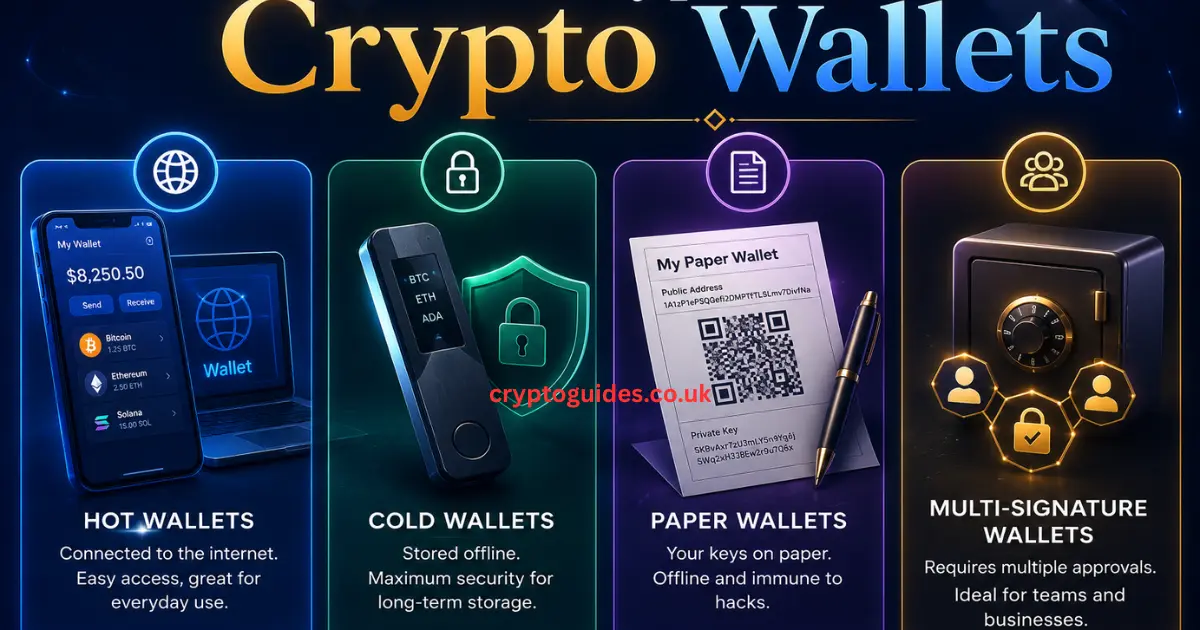
Not every digital wallet for crypto works the same way. Some connect to the internet. Some sit offline in your drawer. Some give you full control. Others hand that control to a company. Understanding the differences isn’t just useful — it could save you from a very expensive mistake. The three main categories are hosted wallets, non-custodial crypto wallets, and hardware crypto wallets. Each one serves a different type of user.
| Wallet Type | Internet Connected | You Control Keys | Best For |
|---|---|---|---|
| Hosted (Custodial) | ✅ Yes | ❌ No | Beginners |
| Non-Custodial | ✅ Yes | ✅ Yes | Intermediate Users |
| Hardware (Cold) | ❌ No | ✅ Yes | Long-Term Holders |
| Mobile Wallet | ✅ Yes | ✅ Yes | Daily Use |
| Desktop Wallet | ✅ Yes | ✅ Yes | Regular Traders |
| Web Wallet | ✅ Yes | Depends | Quick Access |
Hosted Wallets: Easy But Are They Safe?
A hosted crypto wallet — also called a custodial crypto wallet — is managed by a third party, usually a crypto exchange like Coinbase or Binance. When you create an account on these platforms, they generate and store your private keys on your behalf. You log in with an email and password, just like any other online account. That makes it the most popular choice for beginner crypto wallet users who want something simple. The tradeoff? You don’t actually own your keys. And in crypto, there’s a saying that carries real weight: “Not your keys, not your coins.” If the exchange gets hacked, freezes accounts, or shuts down, your funds could be at risk.
That said, custodial wallets from reputable exchanges offer features that genuinely help beginners. They provide crypto wallet with password recovery, customer support, and built-in identity protection. For someone just learning how to buy and store crypto, starting with a secure crypto exchange like Coinbase is a perfectly reasonable first step. Just don’t leave large amounts sitting there long-term.
Non-Custodial Wallets: True Crypto Ownership
A non-custodial crypto wallet puts you fully in charge. No company holds your keys. No platform can freeze your funds. You are your own bank — completely. Tools like Trust Wallet and MetaMask are the most popular examples of this self-custody wallet category. When you set one up, you receive a wallet seed phrase — typically 12 or 24 words — and that phrase is the only way to recover your crypto asset ownership. There’s no support team to call. No password reset button. Just you and your seed phrase.
This type of private crypto wallet is the foundation of everything happening in decentralized finance. Want to access DeFi wallet protocols, trade NFTs, or interact with Web3 applications? You need a non-custodial wallet to do it. Decentralized apps don’t work with exchange accounts — they connect directly to your wallet. That’s why self-managed wallets like Trust Wallet have exploded in popularity. True crypto asset ownership starts here.
Hardware Wallets: The Fort Knox of Crypto Storage
A hardware crypto wallet is a small physical device — similar to a USB drive — that stores your crypto private keys completely offline. Brands like Ledger wallet and Trezor wallet dominate this space. Because the device never connects to the internet directly, it’s virtually immune to remote hacking. Even if your computer gets infected with malware, your keys stay safe inside the device. This is what people mean when they talk about cold storage crypto or offline crypto storage.
Hardware wallet setup takes slightly longer than a software wallet — usually 15 to 30 minutes. But for anyone storing significant amounts of crypto long-term, it’s the single best investment in secure cryptocurrency storage you can make. A Ledger wallet costs around $79. Losing thousands in crypto because you skipped that purchase would sting far worse.
How to Get a Crypto Wallet: Step-by-Step for Beginners
Getting your first crypto wallet setup done correctly protects you from day one. Most beginners rush through this process and skip the security steps. Don’t do that. Whether you choose a hosted crypto wallet, a self-custody wallet, or a cold wallet, the setup process takes less than 30 minutes. Follow each step carefully and you’ll avoid the most common mistakes that cost people their funds.
There are three main setup paths depending on which wallet type fits your needs. A Coinbase wallet setup works best if you want simplicity and a smooth entry point. A Trust Wallet setup works best if you want real crypto asset ownership and access to Web3 applications. A Ledger wallet setup works best if you’re focused on long-term secure offline wallet storage. Let’s walk through all three.
Step-by-Step — How to Set Up a Hosted Wallet (Coinbase)
Coinbase is one of the most trusted names in encrypted digital storage and cryptocurrency management for American users. Setting up a beginner crypto wallet here is genuinely straightforward.
- Visit coinbase.com and click “Get Started”
- Enter your email address and create a strong, unique password
- Verify your email and complete the identity verification (KYC) process
- Enable two-factor authentication crypto (2FA) — this is not optional
- Add a payment method to fund your account
- Purchase crypto and it automatically goes into your exchange wallet account
The entire process takes about 10 minutes. Coinbase uses crypto wallet encryption and complies with US financial regulations, making it one of the safest online crypto wallets for beginners. Once set up, you can send and receive crypto immediately.
Step-by-Step — How to Set Up a Non-Custodial Wallet (Trust Wallet)
Trust Wallet is the leading self-custody wallet for Web3 wallet users globally. Setting it up gives you immediate access to DeFi wallet protocols, NFT wallet features, and staking crypto opportunities.
- Download Trust Wallet from trustwallet.com or your app store
- Tap “Create New Wallet”
- Read the security warning — take it seriously
- Write down your 12-word recovery phrase on paper — never digitally
- Confirm your recovery phrase in the correct order
- Your mobile crypto wallet is ready to use
Never screenshot your wallet backup phrase. Never store it in a cloud service. Write it on paper and keep it somewhere only you can access. This is your crypto wallet recovery lifeline — lose it and your funds are gone permanently.
Step-by-Step — How to Set Up a Hardware Wallet (Ledger)
A Ledger wallet is the gold standard for cold wallet security. Here’s how to set one up safely.
- Buy directly from ledger.com — never from third-party sellers
- Download the Ledger Live app on your computer or phone
- Connect your Ledger device via USB and follow the on-screen setup
- Create a strong PIN code for the device itself
- Write down your 24-word seed phrase backup on the provided recovery sheet
- Store that sheet somewhere physically secure — a fireproof safe works well
- Install the coin apps you need (Bitcoin, Ethereum, etc.) inside Ledger Live
- Transfer crypto assets from your exchange to your Ledger address
Your USB crypto wallet is now fully set up and your crypto is in offline crypto storage. Nobody can access it remotely. That’s the entire point.
Trust Wallet: Best Crypto Wallet for Web3, NFTs and DeFi
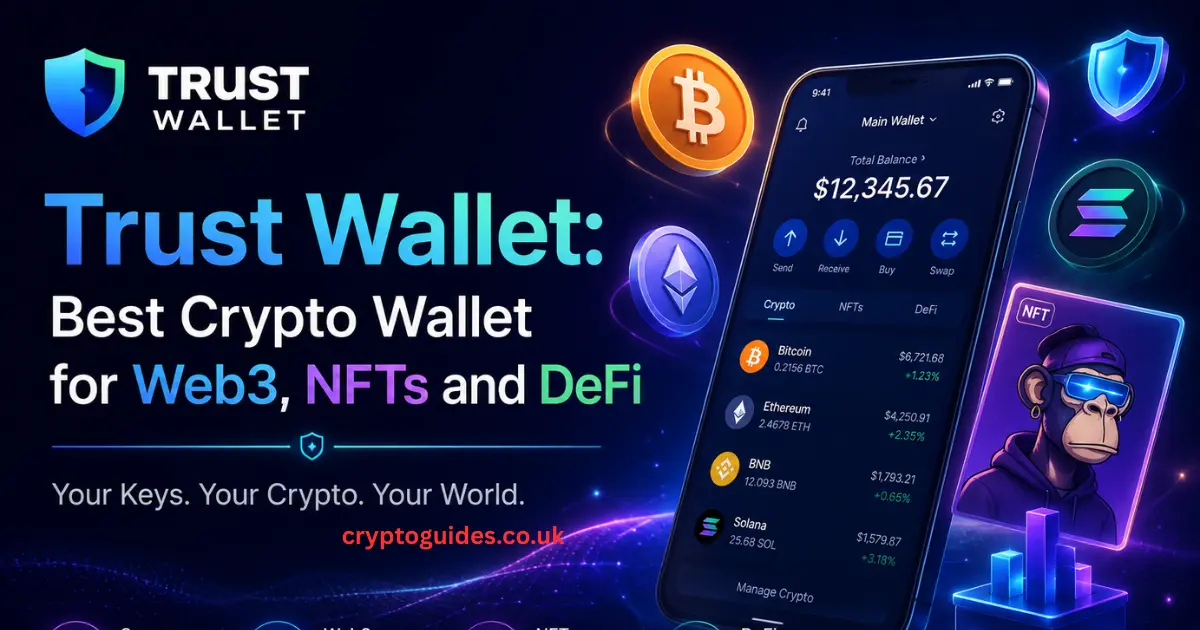
Trust Wallet isn’t just popular — it’s the benchmark for what a non-custodial crypto wallet should look like in 2026. It supports staking crypto, yield farming wallet features, an integrated NFT wallet, and direct access to hundreds of decentralized apps. For anyone serious about the decentralized finance wallet space, Trust Wallet delivers everything under one roof. It’s fast, clean, and built for real crypto asset ownership.
What makes Trust Wallet stand apart from competitors isn’t just its feature set — it’s the philosophy behind it. The app was built on the principle that your crypto belongs to you, not to a platform. There’s no middleman holding your keys. No company that can freeze your funds. No algorithm deciding what you can or can’t do with your digital assets. You are in complete control. For US users who value financial freedom, that principle resonates deeply.
Trusted by 200M People
Over 200 million users worldwide have chosen Trust Wallet as their crypto payment wallet. That kind of adoption doesn’t happen by accident. It reflects genuine trust built through years of reliable blockchain security and consistent performance across 100+ blockchains. When that many people stake their digital assets on a single platform, it sends a clear signal about quality.
Founded in 2017
Trust Wallet launched in 2017 — which in crypto years makes it a seasoned veteran. It was acquired by Binance in 2018 but continues to operate independently. That history matters. Many software wallets come and go. Trust Wallet has survived multiple market cycles, regulatory shifts, and security challenges. That track record is part of why it remains the top choice for secure crypto storage.
Independently Audited
Trust Wallet undergoes regular third-party blockchain security audits. Independent security firms review the code to identify vulnerabilities before bad actors do. For users trusting the platform with their crypto private keys, knowing that outside experts regularly verify the security architecture provides genuine peace of mind. This isn’t marketing — it’s a measurable commitment to crypto wallet protection.
ISO Certified
ISO certification means Trust Wallet meets internationally recognized standards for information security management. For Americans comparing cryptocurrency wallet options, this certification is a meaningful differentiator. Most wallet apps don’t have it. Trust Wallet does.
Top Reviews
Trust Wallet consistently earns 4.5+ star ratings on both the Apple App Store and Google Play. Millions of verified user reviews highlight its ease of use, broad blockchain technology support, and reliable crypto wallet security. In a market full of flashy newcomers, those sustained ratings reflect a product that actually delivers.
True Crypto Ownership: Powerful Web3 Experiences
True crypto asset ownership means nobody can take your funds without your permission. No bank can freeze your account. No exchange can restrict your access. When you use a self-custody wallet like Trust Wallet, you hold the crypto private keys directly. That’s not a small thing. It’s the entire point of blockchain technology — removing the need to trust a middleman with your money.
Added Security With Encryption
Trust Wallet uses device-level crypto wallet encryption to protect your data locally. Your private keys never leave your device unencrypted. Even if someone physically stole your phone, they’d need your passcode to access anything. That layered wallet authentication system is part of what makes Trust Wallet a leader in secure cryptocurrency storage.
Zero Personal Tracking
Trust Wallet collects zero personal data. No name. No email. No transaction history sent to a central server. Your crypto investing activity stays completely private. In a world where data privacy is increasingly rare, that commitment to zero personal tracking is something US users genuinely appreciate.
Proactive Alerts for Risky Transactions
Trust Wallet flags suspicious activity before you confirm it. If a transaction looks unusual — like interacting with a known crypto phishing protection flagged contract — the app warns you first. That proactive layer of blockchain security catches mistakes before they become losses.
One Platform, Millions of Assets
One of the biggest headaches in cryptocurrency management is needing multiple wallets for different coins. Trust Wallet solves that completely. It supports more digital assets, more blockchain technology networks, and more decentralized apps than almost any competitor. Whether you’re holding Bitcoin, exploring Ethereum wallet setup features, or jumping into the latest DeFi wallet protocol, Trust Wallet handles it all from one clean interface.
For users serious about crypto portfolio management, having everything in one place isn’t just convenient — it’s strategically smart. Switching between multiple apps increases the risk of mistakes. It also makes secure seed phrase storage more complicated. Consolidating everything under one trusted Web3 wallet streamlines your entire crypto experience.
10M+ Assets Supported
Trust Wallet supports over 10 million digital assets across hundreds of networks. Whether you’re holding mainstream coins like Bitcoin and Ethereum or exploring smaller altcoins and tokens, Trust Wallet almost certainly supports it. For users building a diverse crypto portfolio management strategy, that breadth of support is invaluable.
600M+ NFTs
Trust Wallet’s built-in NFT wallet lets you view, manage, and transfer over 600 million NFTs directly inside the app. No third-party app needed. No complicated integrations. Your digital assets — fungible and non-fungible — live in the same place. For anyone active in the NFT space, this feature alone makes Trust Wallet worth choosing.
100+ Blockchains
Supporting over 100 blockchains means Trust Wallet works across virtually every major blockchain technology network in existence today. Ethereum, BNB Chain, Solana, Polygon, Avalanche — they’re all there. That multi-chain support future-proofs your wallet. As new networks emerge, Trust Wallet typically adds support quickly, keeping you ahead of the curve in decentralized finance.
Simple. Seamless: Getting Started Has Never Been Easier
Complexity is the number one reason beginners abandon their crypto wallet setup before they finish. Confusing interfaces, technical jargon, and unclear instructions send thousands of potential users back to the sidelines every month. Trust Wallet eliminates that friction. The interface is clean, logical, and designed for people who don’t have a computer science degree. You don’t need one. You just need five minutes and a smartphone.
The simplicity of Trust Wallet doesn’t come at the cost of capability. Under that clean surface lives a powerful Web3 wallet engine capable of handling yield farming wallet strategies, staking crypto positions, cross-chain transfer crypto assets operations, and full decentralized apps integration. Beginners get simplicity. Power users get depth. That combination is rare in the software wallet space.
Deposit Crypto Easily From Exchanges
Moving your crypto from an exchange like Coinbase or Binance into Trust Wallet is a straightforward transfer crypto assets process. Open Trust Wallet and tap the coin you want to receive. Copy your wallet address. Go to your exchange, click “Withdraw,” paste your Trust Wallet address, enter the amount, and confirm. The crypto typically arrives within minutes depending on network congestion. Always send a small test amount first — especially if it’s your first time making that particular transfer.
Stay Private and Secure With Your Crypto Wallet
Crypto wallet security isn’t something you set up once and forget. It’s an ongoing practice. The most common way people lose their crypto isn’t sophisticated hacking — it’s basic human error. Sharing a seed phrase. Clicking a phishing link. Downloading a fake wallet app. Using the same password across multiple platforms. These mistakes happen to experienced users too, not just beginners. Building strong security habits from day one protects you far better than any single tool can.
The US crypto market has seen a sharp rise in crypto phishing protection incidents over the past two years. Scammers create fake wallet apps, fake support pages, and fake giveaway websites designed to steal your crypto private keys. Your best defense is knowledge. Never share your seed phrase backup with anyone — not even someone claiming to be from customer support. No legitimate company will ever ask for it.
True Ownership of Your Crypto Assets
Self-custody wallet users are their own banks. That comes with real power and real responsibility. When you hold your own private key storage, nobody can take your funds without physical or digital access to your device and your seed phrase. That’s an extraordinary level of financial sovereignty. But it also means there’s no one to call if you make a mistake. No refund. No reversal. No recovery — unless you have your wallet backup phrase stored safely.
Your One-Stop Web3 Wallet
The DeFi wallet landscape has exploded. Today, you can staking crypto for passive income, participate in crypto lending, explore yield farming wallet strategies, buy NFTs, and interact with hundreds of Web3 applications — all without ever touching a centralized exchange. A quality self-custody wallet like Trust Wallet gives you access to all of it. One app. One wallet seed phrase. Unlimited possibilities in the decentralized finance world.
What Is a Crypto Wallet?: N26 Beginner’s Breakdown
According to N26’s beginner guide, “a crypto wallet is a digital wallet for cryptocurrency — each kind comes with its own pros and cons.” That’s about as clean a definition as you’ll find. What matters most for beginners is understanding that different wallet types serve different purposes, and choosing the right one depends entirely on how you plan to use your digital assets.
Cryptocurrency management doesn’t have to be complicated. Once you understand the basics — public vs. private keys, custodial vs. non-custodial, hot vs. cold storage — everything else falls into place naturally. The learning curve feels steep at first. But most beginners are fully comfortable with their wallet within a week of daily use.
Public vs. Private Keys: What’s the Difference?
Your public key is like your home address. You can give it to anyone who wants to send you mail — or in this case, crypto. It’s visible on the blockchain and perfectly safe to share. Your private key storage is the key to your front door. Share it with the wrong person and they walk right in and take everything. The golden rule of crypto wallet security: your public key is for sharing, your private key is for protecting.
Here’s a table that makes this crystal clear:
| Key Type | Purpose | Safe to Share? | Example Use |
|---|---|---|---|
| Public Key | Receive crypto | ✅ Yes | Give to sender |
| Private Key | Authorize transactions | ❌ Never | Signs outgoing transfers |
| Seed Phrase | Wallet recovery | ❌ Never | Restores lost wallet |
How Do I Send Crypto From My Crypto Wallet?
Sending crypto from any cryptocurrency wallet follows the same basic process regardless of which app you use. Open your wallet and select the coin you want to send. Tap “Send.” Enter the recipient’s wallet address — or scan their QR code. Enter the amount you want to transfer crypto assets. Review the network fee. Confirm the transaction. That’s it. The blockchain technology handles the rest automatically, usually within seconds to a few minutes depending on network traffic.
One critical habit: always double-check the recipient address before confirming. Safe crypto transactions start with verifying addresses carefully. Blockchain transactions are irreversible. There’s no undo button.
Which Type of Software Wallet Is Best for Me?
Choosing the right software wallet comes down to your personal situation. Here’s a straightforward decision guide:
| Your Situation | Best Wallet Choice |
|---|---|
| Total beginner, wants simplicity | Coinbase (Hosted Wallet) |
| Values privacy and full control | Trust Wallet (Non-Custodial) |
| Long-term holder, security first | Ledger (Hardware Wallet) |
| Active DeFi and NFT user | Trust Wallet or MetaMask |
| Daily small transactions | Mobile crypto wallet |
| Desktop trading | Desktop wallet like Exodus |
How to Choose the Best Crypto Wallet in 2026
Choosing the best crypto wallet for beginners in 2026 means weighing five key factors: security, ease of use, supported assets, fees, and your long-term crypto goals. A beginner crypto wallet that’s perfect for someone just buying their first Bitcoin might be completely wrong for someone building a DeFi wallet portfolio. Matching the wallet to your specific situation is what separates smart crypto investing decisions from costly ones.
Crypto wallet protection features vary significantly across platforms. Some offer two-factor authentication crypto support. Some include built-in crypto phishing protection alerts. Others focus purely on simplicity with minimal security layers. The safest approach for US users is to choose a wallet that balances strong blockchain security with an interface you’ll actually use consistently.
What Is the Best Wallet for Bitcoin in the USA?
For American users focused specifically on store Bitcoin safely, three options stand out in 2026. Coinbase offers the easiest Coinbase wallet setup experience with strong regulatory compliance. Trust Wallet provides full self-custody wallet control with multi-chain flexibility. Ledger delivers the most robust cold storage crypto security for large Bitcoin holdings. The best choice depends on how much Bitcoin you hold and how often you need to access it.
What Is a Hardware Crypto Wallet?
A hardware crypto wallet is a physical crypto security device that stores your crypto private keys in an isolated environment completely disconnected from the internet. Ledger wallet and Trezor wallet are the two most trusted brands in the best hardware wallet category. These devices require physical confirmation for every transaction — meaning even if a hacker controls your computer, they can’t move your funds without touching the device itself. For secure offline wallet storage of significant holdings, no other solution comes close.
What Is a Crypto Wallet App?
A crypto wallet app is a mobile crypto wallet you install on your smartphone. Apps like Trust Wallet, MetaMask, and Coinbase Wallet are designed for cryptocurrency management on the go. They provide full send and receive crypto functionality, DeFi wallet access, NFT wallet support, and often built-in crypto exchange wallet features for swapping between coins. The convenience of a mobile crypto wallet makes it the most popular choice for everyday crypto payment wallet use.
How Do I Back Up My Crypto Wallet?
Crypto wallet recovery depends entirely on one thing: your seed phrase backup. When you first set up a non-custodial crypto wallet, the app generates a 12-word recovery phrase or 24-word recovery phrase unique to your wallet. Write it down — physically, on paper — in the exact order shown. Store it somewhere secure and offline. A fireproof safe is ideal. Never store your wallet backup phrase in a screenshot, a cloud drive, or a note-taking app. If your phone breaks, gets stolen, or the app stops working, that phrase is the only way to restore your digital assets on a new device.
What Cryptocurrencies Can I Keep in My Crypto Wallet?
It depends on the wallet. Single-chain wallets like a dedicated bitcoin wallet only support Bitcoin and sometimes a handful of Bitcoin-based tokens. Multi-chain wallets like Trust Wallet support thousands of digital assets across 100+ blockchains, including Bitcoin, Ethereum, BNB, Solana, Polygon, and countless DeFi wallet tokens. Before choosing a wallet for crypto portfolio management, check that it supports every coin you plan to hold. Moving assets between wallets costs fees and takes time.
What Is Cryptocurrency Custody?
Cryptocurrency custody refers to who holds and manages your crypto private keys. In a custodial crypto wallet, a company — like a secure crypto exchange — holds your keys on your behalf. In a non-custodial crypto wallet, you hold your own keys. Secure asset custody is one of the most debated topics in crypto regulation, especially in the US, where regulators increasingly scrutinize how exchanges handle encrypted digital storage of customer funds. For individual users, the custody question boils down to control vs. convenience.
What Is a Bitcoin Wallet?
A bitcoin wallet is any cryptocurrency wallet that supports the Bitcoin network. Some wallets are Bitcoin-exclusive — like the original Bitcoin Core desktop client. Others, like Trust Wallet and Ledger, support Bitcoin alongside thousands of other digital assets. A dedicated bitcoin wallet sometimes offers deeper Bitcoin-specific features like Lightning Network support for faster peer-to-peer transactions. For someone whose crypto investing strategy is 100% Bitcoin, a specialized bitcoin wallet can make sense. For everyone else, a multi-asset wallet like Trust Wallet handles Bitcoin just as well.
Trust Wallet Is One of the Highest-Rated Self-Custody Crypto Wallets
Independent ratings don’t lie. Trust Wallet consistently ranks among the top self-custody wallet options across every major review platform. On the Apple App Store, it holds a 4.7-star rating from over 500,000 reviews. On Google Play, the numbers tell a similar story. Those ratings come from real users managing real digital assets — people who depend on the app for everything from daily crypto payment wallet use to long-term secure crypto storage of significant holdings.
Industry publications like CoinDesk, Forbes Advisor, and Investopedia regularly list Trust Wallet among the top picks for best crypto wallet for beginners and experienced users alike. Its combination of crypto wallet security, broad blockchain technology support, and genuine commitment to crypto asset ownership gives it an edge that few competitors match. For US users entering the decentralized finance space in 2026, Trust Wallet remains the benchmark.
Enjoy a Web3 Experience Powered by Community
The Web3 wallet movement is bigger than any single app. It’s a philosophy — that blockchain technology should give individuals real control over their digital assets, their data, and their financial lives. Trust Wallet was built inside that philosophy and continues to evolve through it. The company actively engages its community of 200 million users to shape product development, flag security concerns, and push the decentralized apps ecosystem forward.
Staking crypto, crypto lending, yield farming wallet participation, and NFT creation are no longer niche activities reserved for tech insiders. They’re mainstream features accessible to anyone with a Web3 wallet and five minutes to explore. Trust Wallet’s community-powered roadmap ensures the app stays ahead of where decentralized finance is heading — not just where it’s been.
Building on Trust: Security You Can Actually Count On
Security isn’t a feature at Trust Wallet — it’s the foundation. Every aspect of the app is built around protecting your crypto private keys and giving you genuine crypto asset ownership. Regular independent audits, ISO certified security management standards, device-level crypto wallet encryption, and proactive crypto phishing protection alerts all work together to create a secure cryptocurrency storage environment that holds up under real-world pressure.
Blockchain security in 2026 faces more sophisticated threats than ever before. Phishing attacks, malicious smart contracts, fake wallet apps, and social engineering scams target crypto users daily. Trust Wallet’s multi-layered crypto wallet protection system is specifically designed to counter these threats. The app doesn’t just react to security problems — it anticipates them. For anyone serious about protect private keys best practices, that proactive posture is exactly what you want in a self-custody wallet.
Frequently Asked Questions: How to Get a Crypto Wallet
Q: How do I get a crypto wallet for free?
Both Trust Wallet and Coinbase offer completely free crypto wallet setup. Download Trust Wallet from trustwallet.com for a free non-custodial crypto wallet or visit coinbase.com for a free hosted crypto wallet. The only costs you’ll encounter are network fees when you make transactions — and those go to the blockchain network, not the wallet provider.
Q: Is it safe to keep crypto in a wallet?
Yes — especially in a self-custody wallet or cold wallet. Secure crypto storage in a non-custodial crypto wallet or hardware crypto wallet is significantly safer than leaving large amounts on an exchange. For everyday amounts, a quality mobile crypto wallet with two-factor authentication crypto enabled offers solid protection.
Q: Can I have more than one crypto wallet?
Absolutely. Many experienced users hold a hosted crypto wallet for easy buying, a self-custody wallet for DeFi wallet activity, and a cold wallet for long-term offline crypto storage. Managing multiple wallets is a smart crypto portfolio management strategy once you’re comfortable with the basics.
Q: What happens if I lose my crypto wallet?
If you lose access to a non-custodial crypto wallet — through a broken phone, deleted app, or forgotten PIN — your 12-word recovery phrase or seed phrase backup fully restores your wallet on any new device. If you lose that phrase too, the funds are permanently inaccessible. This is why secure seed phrase storage is the single most important step in the entire crypto wallet setup process.
Q: How long does it take to set up a crypto wallet?
A hosted crypto wallet like Coinbase takes about 10 minutes including identity verification. A non-custodial crypto wallet like Trust Wallet takes under 5 minutes. A hardware wallet setup like Ledger takes 15 to 30 minutes. All three are genuinely straightforward — and every minute you spend doing it right is worth it.
Q: Is a crypto wallet free?
Yes. Most crypto wallets are completely free to download and use. Trust Wallet, MetaMask, and Coinbase Wallet cost nothing. The only fees you pay are network transaction fees when sending crypto — and those go to the blockchain, not the wallet provider. Hardware wallets like Ledger cost around $79 but offer the strongest offline crypto storage security.
Which crypto wallet is best for beginners?
Coinbase Wallet is the easiest starting point for total beginners because it offers password recovery and customer support. Trust Wallet is the best choice if you want real crypto asset ownership from day one. Both are free, beginner-friendly, and trusted by millions of US users in 2026.
Conclusion
Getting your first crypto wallet set up is one of the most important steps you’ll take in your crypto investing journey. Whether you choose the simplicity of a hosted crypto wallet on Coinbase, the freedom of a self-custody wallet on Trust Wallet, or the maximum security of a Ledger wallet for cold storage crypto, the most important thing is that you start with the right information — and that you treat crypto wallet security as seriously as the assets inside it deserve.
Secure your seed phrase backup. Enable two-factor authentication crypto. Never share your crypto private keys with anyone. And if you’re ready to experience real crypto asset ownership with access to the full decentralized finance ecosystem, Trust Wallet is the place to start.

I am an SEO and Guest Posting expert with 5+ years of professional experience in building high-authority backlinks, strategic outreach, and scalable SEO campaigns, especially in the Crypto and Blockchain industry. Passionate about helping brands achieve sustainable organic growth, I specialize in guest posting, white-hat authority link building, content outreach, and digital PR strategies that enhance online credibility and search engine performance. Over the years, I have collaborated with international clients and global brands, delivering result-driven SEO solutions and placements on high-authority, high-DR websites focused on increasing organic traffic, domain authority, and online visibility in competitive markets.